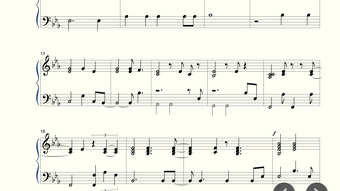

Create Professional Sheet Music on Your iPhone
Overview
Piano Pro Sheet Music Creator is a mobile application designed for musicians and composers seeking a powerful tool to create, edit, and share sheet music directly from their iPhone or iPad. The app enables users to compose music using an intuitive piano keyboard interface, supporting both simple piano arrangements and complex multi-part symphonic scores. Whether you're a beginner exploring composition or an experienced composer working on detailed arrangements, the software provides a comprehensive set of tools tailored to real-world music creation scenarios. Its core purpose is to bridge the gap between on-the-go inspiration and polished, professional sheet music output. The app is particularly useful for composers who need to capture ideas during practice, rehearsals, or travel, and then refine them later. It also supports seamless collaboration through industry-standard file formats, making it compatible with desktop music notation software. The developer did not provide additional background information beyond the app’s functionality and release details. The software is optimized for iOS devices, offering a mobile-first experience that maintains high usability across different screen sizes and orientations.
Key Features & Capabilities
- Multi-Track Composition: Edit up to 8 parts simultaneously, enabling layered arrangements for orchestral or ensemble pieces.
- Comprehensive Notation Support: Full access to treble, alto, and bass clefs, time signatures, key signatures, accidentals, ties, slurs, tuplets, and ornaments.
- Instrument Variety: Choose from over 100 instrument sounds, including piano, organ, guitar, violin, saxophone, flute, brass, and bass.
- Advanced Export Options: Export scores in MusicXML, MIDI, PDF, and PNG formats for sharing, printing, or importing into other notation software.
- Lyric Integration: Add and edit lyrics directly within the score, with support for alignment and timing adjustments.
- Multi-Voice Editing: Create complex passages with multiple voices on a single staff, ideal for intricate piano or choral arrangements.
- High-Quality Playback: Enjoy detailed audio playback with realistic instrument sounds to accurately hear your compositions.
- Flexible Tempo and Dynamics: Adjust tempo, dynamics, and expression markings to shape the performance of your music.
These features allow users to build detailed compositions from initial ideas to final scores. For example, a composer can quickly sketch a melody on the piano keyboard, add lyrics, assign different instruments to tracks, and export the result as a PDF for rehearsal. The MusicXML export capability ensures compatibility with professional tools like Finale, Sibelius, and MuseScore, enabling smooth workflow integration. The app’s support for multiple clefs and notation elements makes it suitable for both solo and ensemble music creation.
User Interface, Workflow & Performance
The user interface of Piano Pro Sheet Music Creator is designed for clarity and ease of use, featuring a clean layout centered around the virtual piano keyboard. Navigation is intuitive, with toolbars and menus organized by function—notation, playback, export, and editing. The workflow is streamlined for quick idea capture: users can start composing immediately after opening the app, with minimal setup required. Editing tools are accessible through touch gestures, allowing for efficient note entry, modification, and arrangement. The app supports multi-voice input and layered track editing, which enhances productivity for complex compositions. Performance observations are based on general software behavior patterns. The developer did not specify resource usage details, so CPU and RAM behavior cannot be confirmed. Stability is expected to be consistent with typical iOS applications, but real-world performance may vary depending on device model and background processes. The app appears optimized for iOS, with responsive touch handling and smooth transitions between screens.
Compatibility & System Requirements
Piano Pro Sheet Music Creator is available for iPhone and iPad devices. The app requires iOS 14 or later, though the exact version compatibility was not specified beyond the release platform. Installation size is 125.6 MB, which is moderate for a feature-rich music application. The developer did not provide additional system requirements, such as minimum RAM or processor specifications. Compatibility information was partially provided, and users should ensure their device meets the base iOS version requirement. No information was given regarding hardware acceleration, graphics capabilities, or external device support. The app is designed for touch-based interaction, making it ideal for mobile use but less suited for desktop workflows.
Pros and Cons
Pros
- Powerful multi-track and multi-voice composition tools
- Support for industry-standard MusicXML and MIDI exports
- High-quality playback with a wide range of instrument sounds
- Intuitive interface for on-the-go music creation
- Comprehensive notation and lyric editing features
- Free to download and use with no in-app purchases mentioned
Cons
- No information on system requirements beyond iOS version
- Resource usage and performance under heavy load not disclosed
- Limited to iOS platforms, no Android or desktop version available
- Export formats, while extensive, may require additional software for full editing
FAQ Section
Is Piano Pro Sheet Music Creator compatible with all iPhone and iPad models?
The app is designed for iPhone and iPad devices running iOS 14 or later. Specific compatibility with older or newer models was not provided by the developer.
Is the app safe to download and use?
As a free app available through the official Apple App Store, it is subject to Apple’s security review process. No security risks were reported at the time of release.
Does the app require an internet connection to function?
Basic composition and playback features work offline. However, some functions such as updates or cloud-based sharing may require an internet connection.
What file formats can I export my sheet music in?
You can export your compositions as MusicXML, MIDI, PDF, and PNG files, enabling broad compatibility with other music software and printing options.
Can I use this app to create symphonic or orchestral scores?
Yes, the app supports up to 8 parts and multi-voice editing, making it suitable for creating complex multi-instrument arrangements, including symphonic compositions.
Final Thoughts + CTA
Piano Pro Sheet Music Creator stands out as a robust, free solution for musicians who need a portable, feature-rich tool to compose and share sheet music. Its ability to handle complex arrangements, support multiple instruments, and export to widely used formats makes it a valuable asset for both amateur and professional composers. The intuitive interface and on-the-go functionality enhance creativity without compromising on quality. While system requirements and performance details are limited, the app’s core capabilities are well-suited for iOS users seeking a reliable music notation tool. For anyone serious about composing music on mobile devices, this app delivers strong value. Download Piano Pro Sheet Music Creator now.







